Struts File Upload Tutorial
- Details
- Written by Nam Ha Minh
- Last Updated on 03 August 2019 | Print Email
- Struts framework distribution (Download Struts).
- Log4J distribution (Download Log4J 1.2.17)
- Eclipse IDE for Java EE Developers (Download Eclipse Juno 4.2).
- Tomcat server (Download Tomcat 7.0).
1. Setup Eclipse project
2. Configure Tomcat
3. Configure web.xml
4. Configure log4j
5. Configure Struts
6. Code file upload form
7. Code Struts action class
8. Code result page
9. Test the Struts File Upload application
10. References
1. Setup Eclipse project
1.1. Create new project
In Eclipse IDE, switch to Java EE perspective. Select File > New > Dynamic Web Project from main menu.
In the New Dynamic Web Project dialog:
- In the field Project name: type StrutsFileUploader
- Under the section Dynamic web module version, make sure 3.0 is selected.
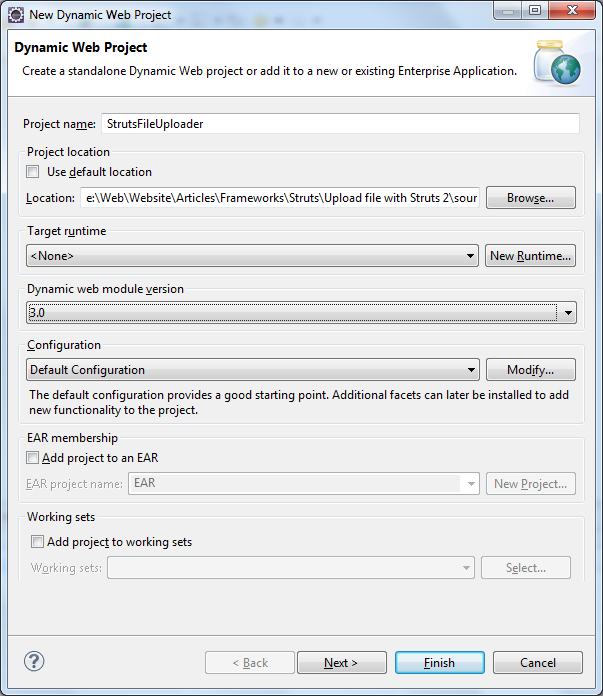
Click Finish, Eclipse will create some bare bone stuff for the project.
1.2. Create Java package
Right click on src under Java Resources, select New > Package. In the dialog New Java Package, type com.struts.uploadinto the Name field:
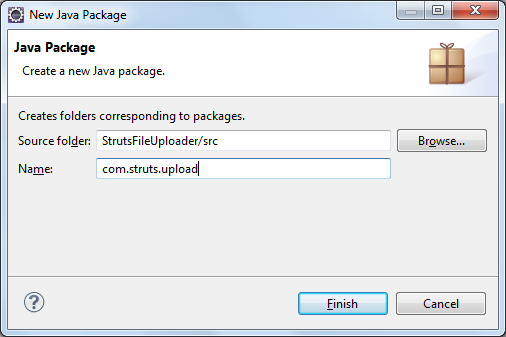
Click Finish to create the package. We will place our Java code in this package.
1.3. Copy Struts JAR libraries
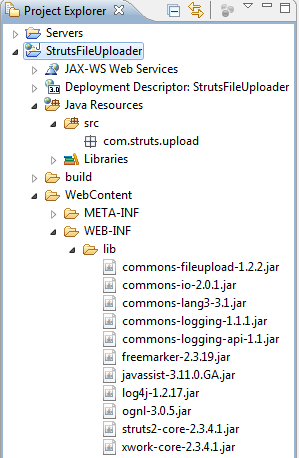
Unpack Struts distribution archive. Copy the following jar files from Struts distribution’s lib directory to project’s WEB-INF/lib directory:
- commons-fileupload-1.2.2.jar
- commons-io-2.0.1.jar
- commons-lang3-3.1.jar
- commons-logging-1.1.1.jar
- commons-logging-api-1.1.jar
- freemarker-2.3.19.jar
- javassist-3.11.0.GA.jar
- ognl-3.0.5.jar
- struts2-core-2.3.4.1.jar
- xwork-core-2.3.4.1.jar
Struts uses Log4J for outputting logging information, so we need to add Log4J’s library JAR file also, copy log4j-1.2.17.jar file from Log4J distribution directory to WEB-INF/lib directory.
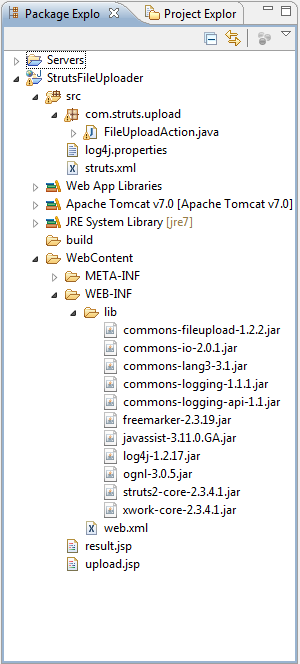
So far the project structure in Project Explorer view looks like the following:
Next, we will configure Tomcat server.
2. Configure Tomcat
We need to add a server to the project in order to automatically deploy and run the web application right inside Eclipse. Switch to Servers view in the workspace (or by select menu Window > Show View > Servers). Click on the link new server wizard: The New Server dialog appears. The first step is to select a server type. Expand the entry Apache and select Tomcat v7.0 Server: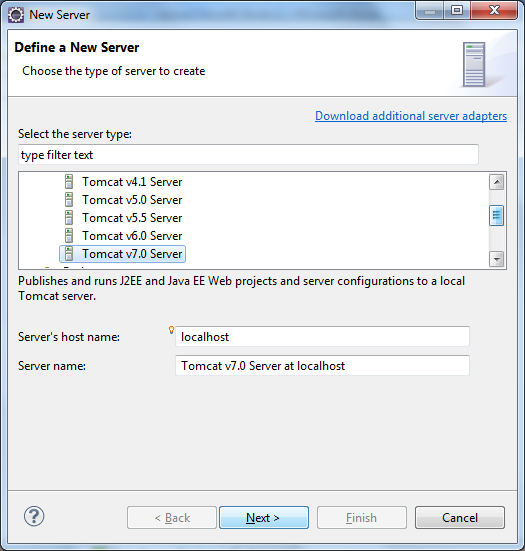
Click Next. In the next screen, Tomcat Server, click Browse button to specify Tomcat installation directory (which is usually under c:\Program Files\Apache Software Foundation\Tomcat 7.0 on Windows):
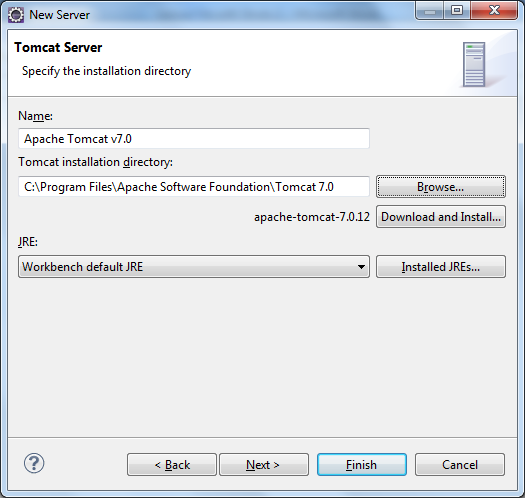
Click Next. In the next screen, Add and Remove, we add the application to be deployed on the server. Select StrutsFileUploader under Available section, Click Add button to move the application to the Configured section:
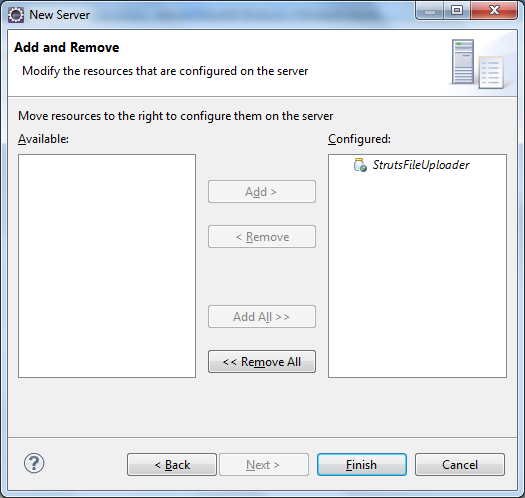
Click Finish. You should see Tomcat v7.0 Server at localhost is added in the Servers view:
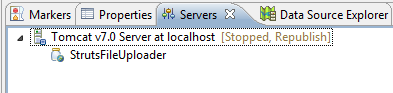
Next, we need to configure Eclipse to choose Tomcat v7.0 as targeted runtime, so all server libraries such as Servlet API will be available to the project. To do this, select Project > Properties. In the dialog Properties for StrutsFileUploader, select Targeted Runtimes on the right column, then check Apache Tomcat v7.0 on the top right:
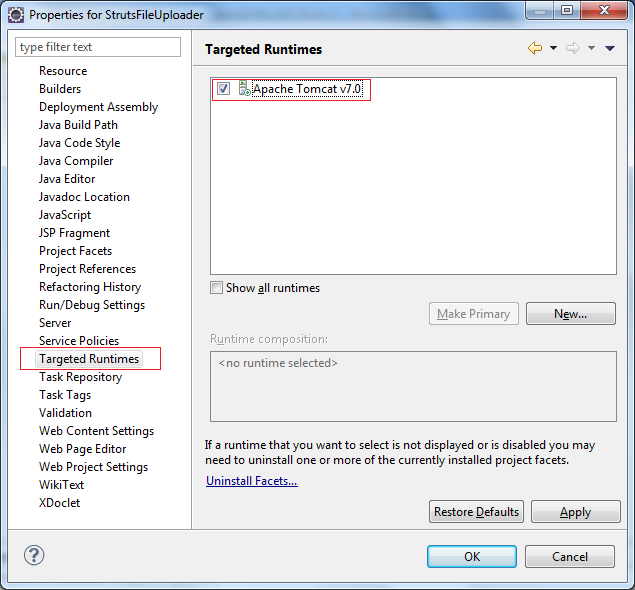
Click OK to close the dialog. We have finished configure the server. Next, we will configure Struts framework for the project.
4. Configure Struts in web.xml
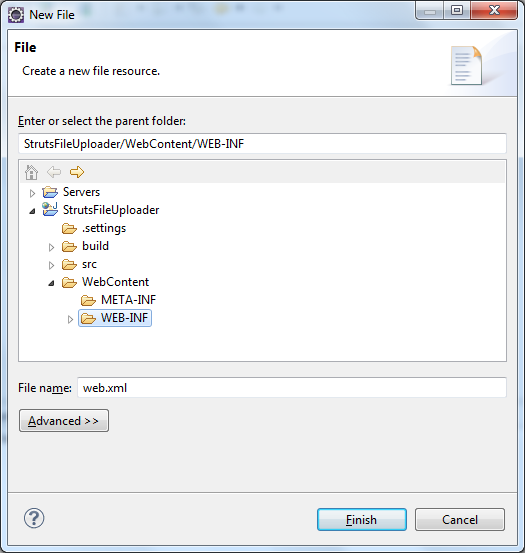
First, it requires creating a web deployment descriptor file (web.xml). Select File > New > File from main menu. In the dialog New File:- Select WEB-INF under WebContent directory.
- Type web.xml into File name field.
<?xml version="1.0" encoding="UTF-8"?>
<web-app id="WebApp_ID" version="2.4"
	xmlns="http://java.sun.com/xml/ns/j2ee"
	xmlns:xsi="http://www.w3.org/2001/XMLSchema-instance"
	xsi:schemaLocation="http://java.sun.com/xml/ns/j2ee
		http://java.sun.com/xml/ns/j2ee/web-app_2_4.xsd">
	<display-name>Strut2 File Upload</display-name>
	<welcome-file-list>
		<welcome-file>upload.jsp</welcome-file>
	</welcome-file-list>

	<filter>
	  <filter-name>struts2</filter-name>
	  <filter-class>org.apache.struts2.dispatcher.ng.filter.StrutsPrepareAndExecuteFilter</filter-class>
	</filter>

	<filter-mapping>
	  <filter-name>struts2</filter-name>
	   <url-pattern>/*</url-pattern>
	</filter-mapping>
</web-app>
The <welcome-file> tag specifies that when the application is accessed by its base URL (i.e http://localhost/Struts2FileUpload) the upload.jsp page is loaded.
The <filter-mapping> section specifies that all URL (denoted by /*) will be processed by Struts filter which is defined by <filter> section.
4. Configure log4j
Create log4j.propertiesfile under src directory and paste the following content:
# LOG4J configuration
log4j.rootLogger=DEBUG, Appender1,Appender2
log4j.appender.Appender2.layout.ConversionPattern=%-5p %d [%t] %c %x - %m%n
log4j.appender.Appender2=org.apache.log4j.RollingFileAppender
log4j.appender.Appender1=org.apache.log4j.ConsoleAppender
log4j.appender.Appender2.File=strut2_fileupload.log
log4j.appender.Appender1.layout=org.apache.log4j.PatternLayout
log4j.appender.Appender2.layout=org.apache.log4j.PatternLayout
log4j.appender.Appender1.layout.ConversionPattern=%-5p%d [%t] %c %x - %m%n
We specify two logging appenders, one or console logging, and another for file logging – which writes logging information to the file struts2_fileupload.log
5. Configure Struts in struts.xml
We will create Struts configuration file, struts.xml, to specify the action that handles file upload with its input page and result page, and some interceptors which intercepts the HTTP request for processing file upload.Right click on src folder, select New > Other… from context menu. Type xml into the search field, send select XML File in the list: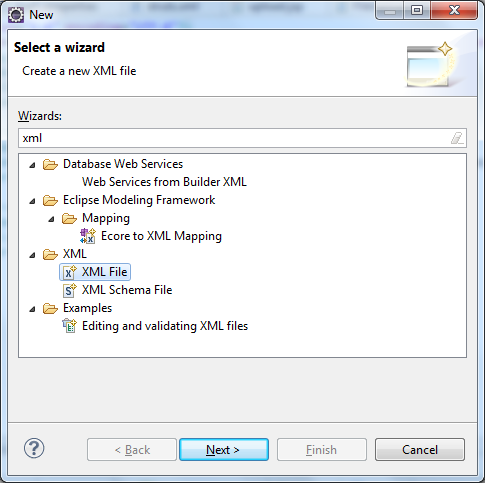
Click Next. In the New XML File screen, type struts.xml into the field File name:
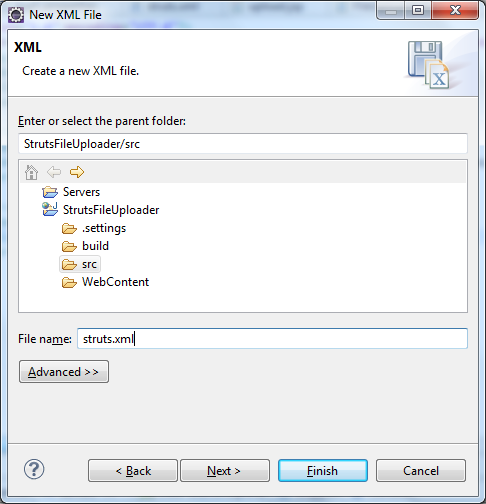
Click Finish. Copy and paste the following content into the struts.xml file’s editor:
<?xml version="1.0" encoding="UTF-8"?>
<!DOCTYPE struts PUBLIC
    "-//Apache Software Foundation//DTD Struts Configuration 2.0//EN"
    "http://struts.apache.org/dtds/struts-2.0.dtd">

<struts>
	<constant name="struts.multipart.maxSize" value="10485760" />

	<package name="fileUpload" extends="struts-default">
		<action name="uploadFile" class="com.struts.upload.FileUploadAction"
			method="doUpload">

            <interceptor-ref name="fileUpload">
       			<param name="allowedTypes">image/jpeg,image/png,image/gif</param>
				<param name="maximumSize">4194304</param>
  	    	</interceptor-ref>
  	    	<interceptor-ref name="params" />
			<interceptor-ref name="validation" />
			<interceptor-ref name="workflow" />

			<result name="success" type="redirect">/result.jsp</result>
			<result name="input">/upload.jsp</result>
		</action>
	</package>

</struts>
This needs some explanation:
- The constant struts.multipart.maxSize specifies maximum size of a multipart request (in bytes). That is for the size of the whole HTTP request, not for an individual upload file.
- We define only action for handling file upload which is named as uploadFile; the implementation class is FileUploadAction under package com.struts.upload; the method will be invoked is doUpload().
- The action will handle requests coming from the upload.jsp page, as specified in the last <result> tag.
- The upload is processed by a Struts interceptor called fileUpload. In this interceptor we specify two parameters:
- allowedTypes: as the name suggests, this parameter specifies which file extensions are allow for uploading. Here we specify only image files.
- maximumSize: specifies maximum size of an individual file which can be uploade. Note this parameter is very different than the parameter struts.multipart.maxSize which is for the whole multipart request.
- The three other interceptors params, validation and workflow are required for processing the multipart request.
- Finally the action will redirect to the result.jsp page if the upload succeeds, as specified in the first <result> tag.
In the next section, we will implement the action class FileUploadAction, but let’s creating an upload form first.
6. Code file upload form
We are about to create a HTML form that allows user to pick up a file to upload.
Right click on WebContent folder, select New > JSP File from context menu. In the New JSP File dialog, type upload.jsp into File name field. Click Finish.
Copy and paste the following code into the upload.jsp file’s editor:
<%@ page language="java" contentType="text/html; charset=utf-8"
    pageEncoding="UTF-8"%>
<%@ taglib prefix="s" uri="/struts-tags" %>
<!DOCTYPE html PUBLIC "-//W3C//DTD HTML 4.01 Transitional//EN" "http://www.w3.org/TR/html4/loose.dtd">
<html>
<head>
<meta http-equiv="Content-Type" content="text/html; charset=ISO-8859-1">
<title>Struts2 File Upload Demo</title>
</head>
<body>
	<center>
		<h1>File Upload with Struts 2</h1>
		<s:form action="uploadFile" enctype="multipart/form-data" method="post">
			<s:file name="fileUpload" label="Select a file to upload" size="30"/>
			<br/>
			<s:submit value="Upload" />
		</s:form>
	</center>
</body>
</html>
As we can see, the upload form is created by using the Struts tag <s:form> with some interesting stuff:
- The form’s action is “uploadFile” which match the name of the action defined in struts.xml file.
- The enctype parameter must be “multipart/form-data” for a request which contains file upload data.
- The Struts tag <s:file> is equivalent to HTML’s tag <input type=”file” /> which displays a text box and a Browse button for the user to pick up a file.
- The Struts tag <s:submit> is equivalent to HTML’s tag <input type=”submit” />.
Next, we will write code for the action class.
7. Code Struts action class
We are going to write code for the action class which is responsible for receiving request from upload.jsp page, copy the uploaded file to desired directory, and finally redirect to the result.jsp page.
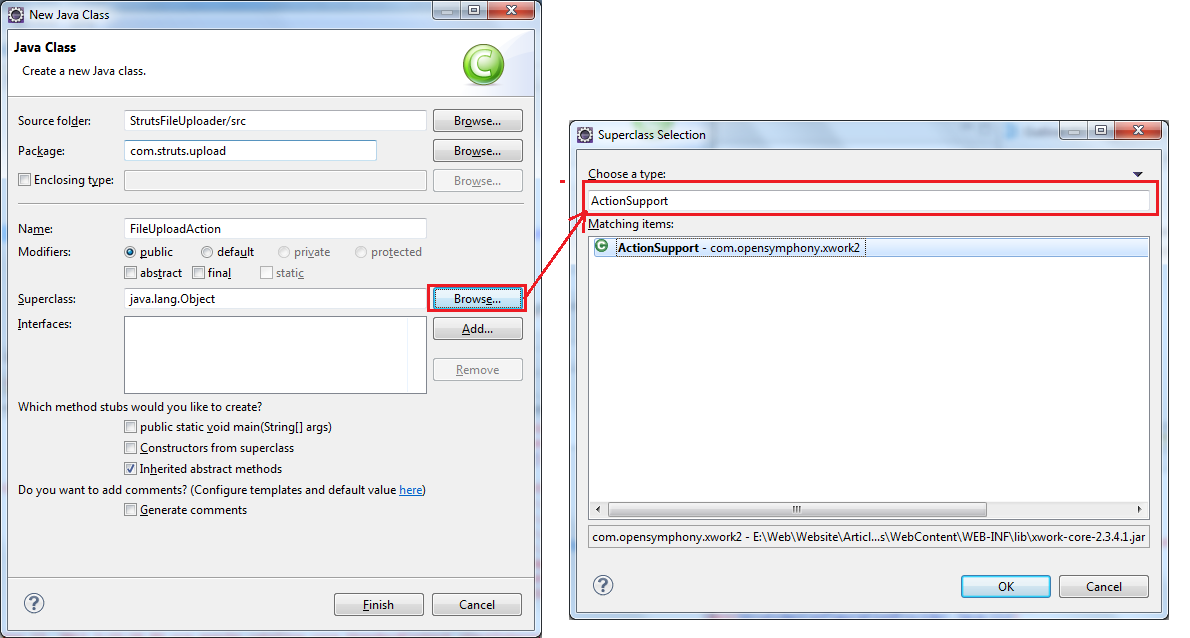
Under src folder, right click on the package com.struts.fileupload, select New > Class. In the New Java Class dialog:
- Type FileUploadAction into the field Name.
- In the Superclass field, click Browse button. Type ActionSupport in the dialog Superclass selection, and select the ActionSupport – com.opensymphony.xwork2. Click OK. We have selected a superclass for the FileUploadAction class.
- Click Finish.
Copy and paste the following code to the FileUploadAction.java file’s editor:
package com.struts.upload;

import java.io.File;
import java.io.IOException;

import org.apache.commons.io.FileUtils;

import com.opensymphony.xwork2.ActionSupport;

public class FileUploadAction extends ActionSupport {
	private File fileUpload;
	private String fileUploadFileName;
	private String fileUploadContentType;

	public String doUpload() {
		File saveFilePath = new File("E:/Upload/" + fileUploadFileName);
		try {
			FileUtils.copyFile(fileUpload, saveFilePath);
		} catch (IOException ex) {
			System.out.println("Couldn't save file: " + ex.getMessage());
		}
		return SUCCESS;
	}

	public String getFileUploadContentType() {
		return fileUploadContentType;
	}

	public void setFileUploadContentType(String fileUploadContentType) {
		this.fileUploadContentType = fileUploadContentType;
	}

	public String getFileUploadFileName() {
		return fileUploadFileName;
	}

	public void setFileUploadFileName(String fileUploadFileName) {
		this.fileUploadFileName = fileUploadFileName;
	}

	public File getFileUpload() {
		return fileUpload;
	}

	public void setFileUpload(File fileUpload) {
		this.fileUpload = fileUpload;
	}

}
In order for the interceptor fileUpload can transfer information about the uploaded file, the action class must declare three pairs of getter and setter:
- getFileUpload() and setFileUpload()
- getFileUploadFileName() and setFileUploadFileName()
- getFileUploadContentType() and setFileUploadContentType()
These pairs of getter and setter are for three variable fileUpload, fileUploadFileName and fileUploadContentType, respectively. The variable fileUpload refers to the actual uploaded file.
The method name doUpload must match the parameter method of the action defined in struts.xml file. Since uploading file is really done by the interceptor, mission of the action class is very simple: just copy the uploaded file to another file. In the above code, we copy the uploaded file to the directory E:/Upload on the server.
Finally, the action class returns a SUCCESS page which maps to the result.jsp page defined in the struts.xml file.
Next, we will create the result.jsp page.
8. Code upload result page
Right click on WebContent folder, select New > JSP File from context menu. In the New JSP File dialog, type result.jsp into File name field. Click Finish.
Copy and paste the following code into the result.jsp file’s editor:<%@ page language="java" contentType="text/html; charset=utf-8"
pageEncoding="UTF-8"%>
<!DOCTYPE html PUBLIC "-//W3C//DTD HTML 4.01 Transitional//EN" "http://www.w3.org/TR/html4/loose.dtd">
<html>
<head>
<meta http-equiv="Content-Type" content="text/html; charset=ISO-8859-1">
<title>Upload result</title>
</head>
<body>
<h2>You have successfully uploaded the file!</h2>
</body>
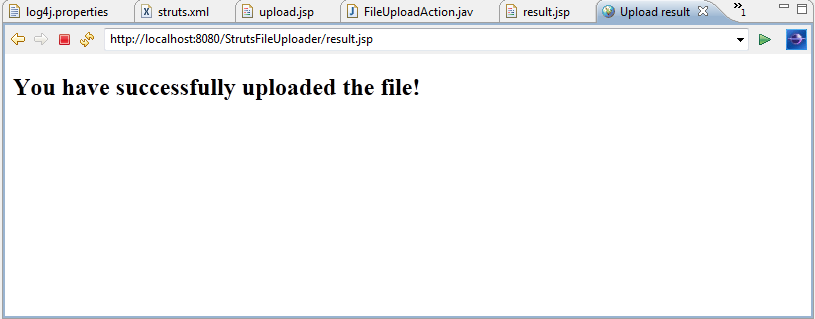
</html> Purpose of the result.jsp page is fairly simple: just tell the user that the upload is successful.
Finally, the project structure should look like this:
9. Test the Struts File Upload application
So far we have finished all the coding part. It’s time to test out the application.
In Project Explorer view, under WebContent, right click on upload.jsp page, select Run As > Run on Server. If Eclipse displays the Run on Server dialog, select Choose an existing server and Tomcat v7.0 Server at localhost.
Eclipse starts Tomcat server and opens its internal browser window to launch the upload.jsp page:
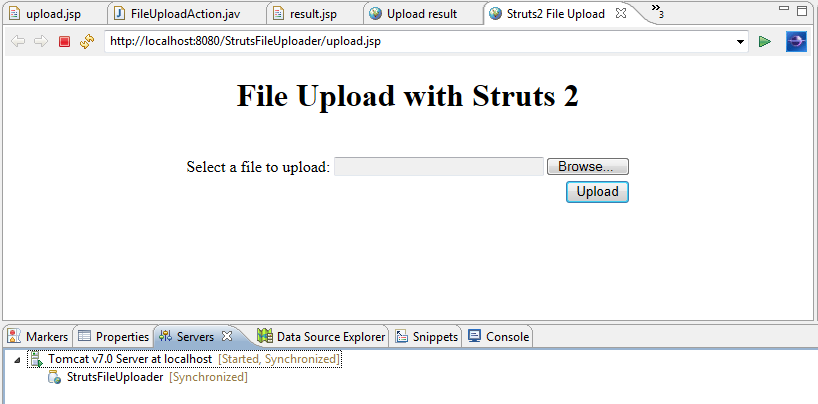
Click Browse button to pick a file and click Upload. The file will be uploaded to the server and the server redirects to the result.jsp page:
Check if the file is actually uploaded to the directory E:/Upload.
NOTE: As specified in the struts.xml file:
- The allowed file types are: jpeg, jpg, png and gif.
- The maximum size for an individual file is 4MB (4,194,304 bytes).
So you can tweak these parameters to suite your need in struts.xml file.
Other Struts Tutorials:
- Introduction to Struts 2 framework
- Struts beginner tutorial (Eclipse + Tomcat + XML)
- Struts Beginner Tutorial with Annotations
- Struts beginner tutorial with Convention Plugin (zero-configuration)
- How to handle exceptions in Struts
- Struts Form Handling Tutorial
- Struts Form Validation Tutorial
- Send e-mail with attachments in Struts
- Struts File Download Tutorial
- Struts - Spring - Hibernate Integration Tutorial
About the Author:
 Nam Ha Minh is certified Java programmer (SCJP and SCWCD). He began programming with Java back in the days of Java 1.4 and has been passionate about it ever since. You can connect with him on Facebook and watch his Java videos on YouTube.
 StrutsFileUploader.zip StrutsFileUploader.zip | [Eclipse project] | 3845 kB |
Comments
By Using setAttribute set byte[] in that and get it at jsp
You can change the location where the file are uploaded in the Struts action class, by modifying this line:
Code:
File saveFilePath = new File("E:/Upload/" + fileUploadFileName);when im upload file i want to save into file like "WebConten/File"
with one small example .